
Minga Onboarding

Quick Start Guide to Intervention & Enrichment

A checklist for School Administrators, Activities Directors, or MTSS Specialists responsible for configuring flexible periods, managing activities, and tracking student attendance and outcomes with FlexTime in Minga.
quotes hero img-1

Impactful FlexTime Starts Here

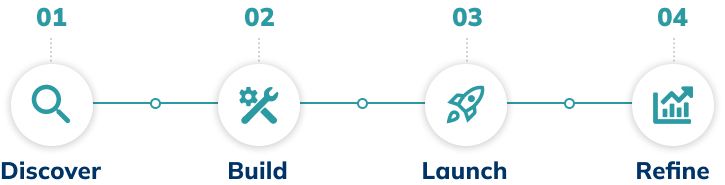
Follow these four stages to kickstart flex period management, build intervention & enrichment activities, and run a student-centered schedule — without the spreadsheets or the chaos.
Scheme Discover-Build-Launch-Intervention
  
👉
Before You Start
Double-check that the technical integration steps are complete. Review the checklist here.
Stage 1

Discover

Watch the FlexTime Introduction series to understand how periods, activities, and attendance work together.
Review the setup and create your FlexTime periods. Map FlexTime with your school schedule. Once completed, activities can be added in bulk or individually by teachers and staff.
Stage 2

Build

Create activities. Build enrichment, support, or intervention sessions with teachers or staff.
Enable check-in system. Decide how students will join activities (e.g., kiosk, teacher check-in).
Create Homerooms for single-click assignment of all unregistered students to an activity.
Prepare your staff. Host a meeting and show teachers and staff how to create activities and take attendance. 
  
💡
TIP:

Enable teacher collaboration on periods. Toggling the collaboration setting when creating a period lets teachers add their own activities.

Stage 3

Launch

Set a date for launch. If you've connected your SIS with Minga, let staff and families know, and some periods and activities created, then you're ready to launch!
Assign students to activities. Teachers and counselors place students who need mandatory support or intervention into specific sessions. Open remaining periods for student self-registration.
Use the FlexTime dashboard. Watch student registrations, check-ins, and unregistered students as each period begins.
Register unregistered students. Identify and place any students who have not registered in their homeroom activities using the FlexTime unregistered report.
image1-ezgif.com-resize-2
Stage 4

Refine

Review attendance and participation. Identify underfilled activities or students not consistently attending.
Make small changes to improve FlexTime processes. Refine how students are placed to reduce gaps, reduce manual follow-up, and adjust restrictions where needed.
  
💡
TIP:

Review. Refine. Repeat. FlexTime evolves with your school. Regularly checking participation and getting feedback turns a good FlexTime program into a great one.

Get more out of FlexTime!

Quick links and additional resources to help you on your journey with Minga
support icon-intervention
Live Training with Step by Step Support
video icon-intervention
Quick Video Tutorials about FlexTime
document icon-intervention
Running MTSS Tier 2 Intervention at Greer Lingle Middle School

More Quick Start Guides

Hallway-card
Tardy card
Pos Beh-card
Neg Beh-card
Intervention-inactive-card
Communication card