Minga Onboarding
Quick Start Guide to Positive Behavior and Rewards
A checklist for PBIS Directors or School Administrators to set up and roll out recognition and rewards in Minga.
Better Student Behavior Starts Here
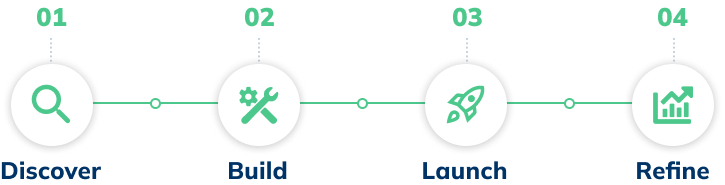
Follow these four stages to configure your behaviors, launch your rewards store, and build a system of student recognition that makes good habits stick.

✋
Before You Start
Double-check that the technical integration steps are complete. Review the checklist here.
Stage 1
Discover
- Watch the Points & Rewards video series for context on how a balanced and equitable points program is created. Minga recommends both participation and individual recognition.
- Identify how you will recognize students. Minga-recommended behaviors are ready to go, but gather input from teachers, staff, and students on behaviors that improve your school, and customize these behaviors in Minga to match.
- Customize and enable parent communication on behaviors. Families love getting reminders of their student's great behavior throughout their day.
💡
TIP:
Keep it simple at first. Start with three to five core behaviors and expand after your first 30 days.
Stage 2
Build
- Enable praise behaviors. Customize or create new behaviors that match your existing school PBIS program for individual student recognition that you identified in the discovery stage.
- Enable praise automations. Automate parent communication and bonus points for students who consistently meet your expectations. Review and enable the pre-set Minga consequences and automations.
- Create events, polls, and challenges. Reward students passively for being an active part of your community with challenges , community polls , or by attending events with point values attached .
- Set up School Teams. An important step to fuel adoption and healthy competition on campus.
- Decide on your reward types. Set up your points store with low and high-value rewards.
Stage 3
Launch
- Host a meeting with teachers and introduce them to My Class, this is their home base in Minga and where they assign behavior. Here is a resource you can share!
- Communicate the new store and prizes to students. A simple poster or announcement of the ways to earn points and store items will create plenty of buzz.
- Set a date for launch. If you've connected your SIS with Minga, reviewed the settings in the app, and let staff and families know, then you're ready to launch!
💡
TIP:
Don't just announce it — make it an event. Empower staff and student leaders to drive excitement on the Home Feed.

Stage 4
Refine
- Review points reports. Identify top-praising teachers and most-redeemed rewards .
- Adjust store items and point values based on feedback. Add new items to continue to test what works and drive interest.
💡
TIP:
Poll students on the Home feed for new items they want to earn.
Get more out of Points and Rewards!
Quick links and additional resources to help you on your journey with Minga